AWS serverless architecture is the best platform to construct scalable REST APIs. This is a step-by-step guide that will detail the process of building production-ready API using Amazon API Gateway and AWS Lambda, including the initial setup process, as well as more complex security and performance optimization.
The Rationale behind Using Serverless with REST APIs?
Serverless APIs present a number of interesting benefits:
- Cost Effectiveness: Pay but when needed, not wasted server bandwidth.
- Auto-scaling: Notice traffic spikes automatically.
- No Server Management: Business, not infrastructure.
- High Availability: There is achieving of built-in redundancy between several AZs.
- Fast Development: Short development and iteration times.
Architecture Overview
Our serverless API infrastructure comprises of:
- API Gateway: This is where all the requests enter with inbuilt functions such as throttling, caching, and authentication.
- Lambda Functions: Multiple runtime environments Lambda implementations Business logic execution.
- DynamoDB: Serverless data persistence database.
- IAM: Access control on a fine-grained basis.
- CloudWatch: Logging and monitoring.
Quick Start: Minimal Working Example
⚡ New to serverless? Start here with this 5-minute minimal working example. You'll have a functioning API before diving into advanced features.
Let's build a simple "Hello World" API that you can deploy and test in minutes. This example demonstrates the core concepts without overwhelming complexity.
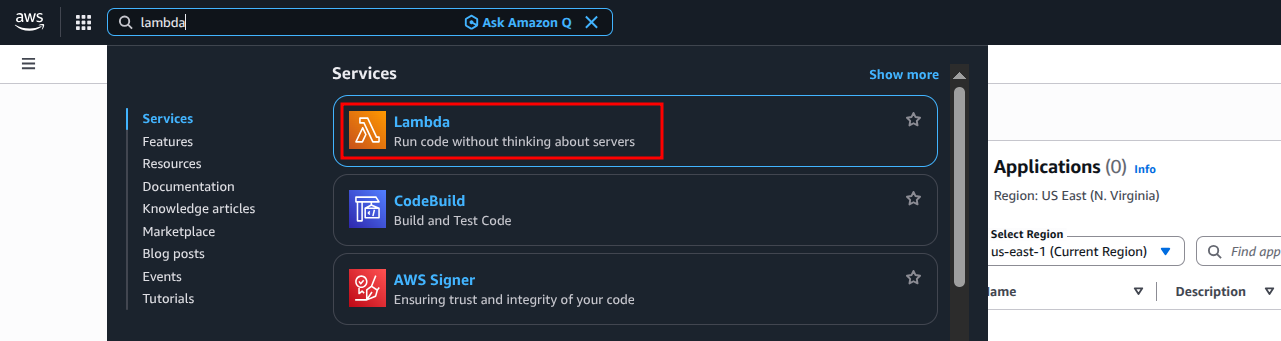
Accessing AWS Lambda from the AWS Management Console - Search for "Lambda" in the services search bar to navigate to the Lambda dashboard where you can create and manage your functions.
Step 1: Create Lambda Function (app.py)
import json

def lambda_handler(event, context):
    """Simple Hello World API endpoint"""

    # Extract HTTP method and path
    method = event.get('httpMethod', 'GET')
    path = event.get('path', '/')

    # Simple routing
    if method == 'GET' and path == '/hello':
        return {
            'statusCode': 200,
            'headers': {
                'Content-Type': 'application/json',
                'Access-Control-Allow-Origin': '*'
            },
            'body': json.dumps({
                'message': 'Hello from serverless!',
                'timestamp': context.request_id
            })
        }

    # Default 404 response
    return {
        'statusCode': 404,
        'body': json.dumps({'error': 'Not Found'})
    }
Step 2: Deploy with AWS SAM (template.yaml)
AWSTemplateFormatVersion: '2010-09-09'
Transform: AWS::Serverless-2016-10-31
Description: Minimal Serverless API Example

Resources:
  # Lambda function
  HelloWorldFunction:
    Type: AWS::Serverless::Function
    Properties:
      Handler: app.lambda_handler
      Runtime: python3.11
      MemorySize: 128
      Timeout: 10
      Events:
        HelloWorldApi:
          Type: Api
          Properties:
            Path: /hello
            Method: GET

Outputs:
  ApiEndpoint:
    Description: "API Gateway endpoint URL"
    Value: !Sub "https://${ServerlessRestApi}.execute-api.${AWS::Region}.amazonaws.com/Prod/hello"
Step 3: Deploy
# Initialize SAM (first time only)
sam init

# Build and deploy
sam build
sam deploy --guided

# Test your API
curl https://YOUR-API-ID.execute-api.us-east-1.amazonaws.com/Prod/hello
Expected Response
{
  "message": "Hello from serverless!",
  "timestamp": "abc123-request-id"
}
✅ You now have a working serverless API! Let's expand this into a production-ready application.
Complete End-to-End Working Example: User Management API
Now let's build a full CRUD API with DynamoDB integration, proper error handling, and security. This complete example is production-ready and demonstrates real-world patterns.
Project Structure
user-api/
├── app.py                  # Lambda function code
├── requirements.txt        # Python dependencies
├── template.yaml           # SAM template
└── terraform/
    ├── main.tf            # Terraform configuration
    ├── variables.tf
    └── outputs.tf
Complete Lambda Function (app.py)
import json
import boto3
import uuid
import os
from datetime import datetime
from boto3.dynamodb.conditions import Key

# Initialize DynamoDB
dynamodb = boto3.resource('dynamodb')
table_name = os.environ.get('TABLE_NAME', 'Users')
table = dynamodb.Table(table_name)

def lambda_handler(event, context):
    """Main handler routing requests to appropriate functions"""

    try:
        http_method = event['httpMethod']
        path = event['path']

        # Route based on HTTP method and path
        if http_method == 'GET' and path == '/users':
            return get_all_users()

        elif http_method == 'GET' and path.startswith('/users/'):
            user_id = path.split('/')[-1]
            return get_user(user_id)

        elif http_method == 'POST' and path == '/users':
            return create_user(event)

        elif http_method == 'PUT' and path.startswith('/users/'):
            user_id = path.split('/')[-1]
            return update_user(user_id, event)

        elif http_method == 'DELETE' and path.startswith('/users/'):
            user_id = path.split('/')[-1]
            return delete_user(user_id)

        else:
            return response(404, {'error': 'Route not found'})

    except Exception as e:
        print(f"Error: {str(e)}")
        return response(500, {'error': 'Internal server error', 'details': str(e)})

def get_all_users():
    """Retrieve all users from DynamoDB"""
    try:
        result = table.scan(Limit=100)

        return response(200, {
            'users': result.get('Items', []),
            'count': len(result.get('Items', []))
        })

    except Exception as e:
        return response(500, {'error': 'Failed to retrieve users', 'details': str(e)})

def get_user(user_id):
    """Get a single user by ID"""
    try:
        result = table.get_item(Key={'userId': user_id})

        if 'Item' not in result:
            return response(404, {'error': 'User not found'})

        return response(200, result['Item'])

    except Exception as e:
        return response(500, {'error': 'Failed to retrieve user', 'details': str(e)})

def create_user(event):
    """Create a new user"""
    try:
        # Parse request body
        body = json.loads(event.get('body', '{}'))

        # Validate required fields
        if not body.get('name') or not body.get('email'):
            return response(400, {'error': 'Name and email are required'})

        # Create user object
        user = {
            'userId': str(uuid.uuid4()),
            'name': body['name'],
            'email': body['email'],
            'createdAt': datetime.utcnow().isoformat(),
            'updatedAt': datetime.utcnow().isoformat()
        }

        # Optional fields
        if body.get('phone'):
            user['phone'] = body['phone']

        # Save to DynamoDB
        table.put_item(Item=user)

        return response(201, {
            'message': 'User created successfully',
            'user': user
        })

    except json.JSONDecodeError:
        return response(400, {'error': 'Invalid JSON in request body'})

    except Exception as e:
        return response(500, {'error': 'Failed to create user', 'details': str(e)})

def update_user(user_id, event):
    """Update existing user"""
    try:
        # Check if user exists
        existing = table.get_item(Key={'userId': user_id})
        if 'Item' not in existing:
            return response(404, {'error': 'User not found'})

        # Parse update data
        body = json.loads(event.get('body', '{}'))

        # Build update expression
        update_expr = "SET updatedAt = :updated"
        expr_values = {':updated': datetime.utcnow().isoformat()}

        if body.get('name'):
            update_expr += ", #n = :name"
            expr_values[':name'] = body['name']

        if body.get('email'):
            update_expr += ", email = :email"
            expr_values[':email'] = body['email']

        if body.get('phone'):
            update_expr += ", phone = :phone"
            expr_values[':phone'] = body['phone']

        # Perform update
        result = table.update_item(
            Key={'userId': user_id},
            UpdateExpression=update_expr,
            ExpressionAttributeNames={'#n': 'name'} if body.get('name') else None,
            ExpressionAttributeValues=expr_values,
            ReturnValues='ALL_NEW'
        )

        return response(200, {
            'message': 'User updated successfully',
            'user': result['Attributes']
        })

    except json.JSONDecodeError:
        return response(400, {'error': 'Invalid JSON in request body'})

    except Exception as e:
        return response(500, {'error': 'Failed to update user', 'details': str(e)})

def delete_user(user_id):
    """Delete a user"""
    try:
        # Check if user exists
        existing = table.get_item(Key={'userId': user_id})
        if 'Item' not in existing:
            return response(404, {'error': 'User not found'})

        # Delete the user
        table.delete_item(Key={'userId': user_id})

        return response(200, {'message': 'User deleted successfully'})

    except Exception as e:
        return response(500, {'error': 'Failed to delete user', 'details': str(e)})

def response(status_code, body):
    """Helper function to format API responses"""
    return {
        'statusCode': status_code,
        'headers': {
            'Content-Type': 'application/json',
            'Access-Control-Allow-Origin': '*',
            'Access-Control-Allow-Headers': 'Content-Type,Authorization',
            'Access-Control-Allow-Methods': 'GET,POST,PUT,DELETE,OPTIONS'
        },
        'body': json.dumps(body)
    }
Complete AWS SAM Template (template.yaml)
AWSTemplateFormatVersion: '2010-09-09'
Transform: AWS::Serverless-2016-10-31
Description: Production-Ready User Management API

Globals:
  Function:
    Timeout: 30
    Runtime: python3.11
    MemorySize: 256
    Environment:
      Variables:
        TABLE_NAME: !Ref UsersTable
    Tracing: Active  # Enable X-Ray

Resources:
  # DynamoDB Table
  UsersTable:
    Type: AWS::DynamoDB::Table
    Properties:
      TableName: Users
      BillingMode: PAY_PER_REQUEST
      AttributeDefinitions:
        - AttributeName: userId
          AttributeType: S
      KeySchema:
        - AttributeName: userId
          KeyType: HASH
      StreamSpecification:
        StreamViewType: NEW_AND_OLD_IMAGES
      PointInTimeRecoverySpecification:
        PointInTimeRecoveryEnabled: true
      Tags:
        - Key: Environment
          Value: Production

  # Lambda Function
  UserApiFunction:
    Type: AWS::Serverless::Function
    Properties:
      FunctionName: UserManagementAPI
      CodeUri: .
      Handler: app.lambda_handler
      Description: User Management CRUD API
      Policies:
        - DynamoDBCrudPolicy:
            TableName: !Ref UsersTable
      Events:
        # GET /users - List all users
        GetUsers:
          Type: Api
          Properties:
            Path: /users
            Method: GET
            RestApiId: !Ref UserApi

        # GET /users/{id} - Get specific user
        GetUser:
          Type: Api
          Properties:
            Path: /users/{id}
            Method: GET
            RestApiId: !Ref UserApi

        # POST /users - Create user
        CreateUser:
          Type: Api
          Properties:
            Path: /users
            Method: POST
            RestApiId: !Ref UserApi

        # PUT /users/{id} - Update user
        UpdateUser:
          Type: Api
          Properties:
            Path: /users/{id}
            Method: PUT
            RestApiId: !Ref UserApi

        # DELETE /users/{id} - Delete user
        DeleteUser:
          Type: Api
          Properties:
            Path: /users/{id}
            Method: DELETE
            RestApiId: !Ref UserApi

  # API Gateway
  UserApi:
    Type: AWS::Serverless::Api
    Properties:
      StageName: Prod
      TracingEnabled: true
      Cors:
        AllowMethods: "'GET,POST,PUT,DELETE,OPTIONS'"
        AllowHeaders: "'Content-Type,Authorization'"
        AllowOrigin: "'*'"
      ThrottleSettings:
        BurstLimit: 100
        RateLimit: 50
      MethodSettings:
        - ResourcePath: '/*'
          HttpMethod: '*'
          LoggingLevel: INFO
          DataTraceEnabled: true
          MetricsEnabled: true

  # CloudWatch Log Group
  ApiLogGroup:
    Type: AWS::Logs::LogGroup
    Properties:
      LogGroupName: !Sub '/aws/lambda/${UserApiFunction}'
      RetentionInDays: 30

  # CloudWatch Alarm for Errors
  ApiErrorAlarm:
    Type: AWS::CloudWatch::Alarm
    Properties:
      AlarmName: UserApiHighErrorRate
      AlarmDescription: Alert when API error rate exceeds threshold
      MetricName: Errors
      Namespace: AWS/Lambda
      Statistic: Sum
      Period: 300
      EvaluationPeriods: 1
      Threshold: 10
      ComparisonOperator: GreaterThanThreshold
      Dimensions:
        - Name: FunctionName
          Value: !Ref UserApiFunction

Outputs:
  ApiEndpoint:
    Description: "API Gateway endpoint URL"
    Value: !Sub "https://${UserApi}.execute-api.${AWS::Region}.amazonaws.com/Prod"

  UsersTableName:
    Description: "DynamoDB table name"
    Value: !Ref UsersTable

  FunctionArn:
    Description: "Lambda Function ARN"
    Value: !GetAtt UserApiFunction.Arn
Complete Terraform Configuration
terraform/main.tf
terraform {
  required_version = ">= 1.0"
  required_providers {
    aws = {
      source  = "hashicorp/aws"
      version = "~> 5.0"
    }
  }
}

provider "aws" {
  region = var.aws_region
}

# DynamoDB Table
resource "aws_dynamodb_table" "users" {
  name           = "Users"
  billing_mode   = "PAY_PER_REQUEST"
  hash_key       = "userId"

  attribute {
    name = "userId"
    type = "S"
  }

  stream_enabled   = true
  stream_view_type = "NEW_AND_OLD_IMAGES"

  point_in_time_recovery {
    enabled = true
  }

  tags = {
    Name        = "Users Table"
    Environment = "Production"
  }
}

# Lambda Execution Role
resource "aws_iam_role" "lambda_role" {
  name = "user-api-lambda-role"

  assume_role_policy = jsonencode({
    Version = "2012-10-17"
    Statement = [{
      Action = "sts:AssumeRole"
      Effect = "Allow"
      Principal = {
        Service = "lambda.amazonaws.com"
      }
    }]
  })
}

# Lambda Policy for DynamoDB Access
resource "aws_iam_role_policy" "lambda_policy" {
  name = "user-api-lambda-policy"
  role = aws_iam_role.lambda_role.id

  policy = jsonencode({
    Version = "2012-10-17"
    Statement = [
      {
        Effect = "Allow"
        Action = [
          "dynamodb:GetItem",
          "dynamodb:PutItem",
          "dynamodb:UpdateItem",
          "dynamodb:DeleteItem",
          "dynamodb:Scan",
          "dynamodb:Query"
        ]
        Resource = aws_dynamodb_table.users.arn
      },
      {
        Effect = "Allow"
        Action = [
          "logs:CreateLogGroup",
          "logs:CreateLogStream",
          "logs:PutLogEvents"
        ]
        Resource = "arn:aws:logs:*:*:*"
      },
      {
        Effect = "Allow"
        Action = [
          "xray:PutTraceSegments",
          "xray:PutTelemetryRecords"
        ]
        Resource = "*"
      }
    ]
  })
}

# Package Lambda function
data "archive_file" "lambda_zip" {
  type        = "zip"
  source_file = "${path.module}/../app.py"
  output_path = "${path.module}/lambda_function.zip"
}

# Lambda Function
resource "aws_lambda_function" "user_api" {
  filename         = data.archive_file.lambda_zip.output_path
  function_name    = "UserManagementAPI"
  role            = aws_iam_role.lambda_role.arn
  handler         = "app.lambda_handler"
  source_code_hash = data.archive_file.lambda_zip.output_base64sha256
  runtime         = "python3.11"
  memory_size     = 256
  timeout         = 30

  environment {
    variables = {
      TABLE_NAME = aws_dynamodb_table.users.name
    }
  }

  tracing_config {
    mode = "Active"
  }

  tags = {
    Name = "User API Lambda"
  }
}

# CloudWatch Log Group
resource "aws_cloudwatch_log_group" "api_logs" {
  name              = "/aws/lambda/${aws_lambda_function.user_api.function_name}"
  retention_in_days = 30
}

# API Gateway REST API
resource "aws_api_gateway_rest_api" "user_api" {
  name        = "UserManagementAPI"
  description = "User Management REST API"

  endpoint_configuration {
    types = ["REGIONAL"]
  }
}

# API Gateway Resource - /users
resource "aws_api_gateway_resource" "users" {
  rest_api_id = aws_api_gateway_rest_api.user_api.id
  parent_id   = aws_api_gateway_rest_api.user_api.root_resource_id
  path_part   = "users"
}

# API Gateway Resource - /users/{id}
resource "aws_api_gateway_resource" "user_id" {
  rest_api_id = aws_api_gateway_rest_api.user_api.id
  parent_id   = aws_api_gateway_resource.users.id
  path_part   = "{id}"
}

# Methods for /users
resource "aws_api_gateway_method" "get_users" {
  rest_api_id   = aws_api_gateway_rest_api.user_api.id
  resource_id   = aws_api_gateway_resource.users.id
  http_method   = "GET"
  authorization = "NONE"
}

resource "aws_api_gateway_method" "post_user" {
  rest_api_id   = aws_api_gateway_rest_api.user_api.id
  resource_id   = aws_api_gateway_resource.users.id
  http_method   = "POST"
  authorization = "NONE"
}

# Methods for /users/{id}
resource "aws_api_gateway_method" "get_user" {
  rest_api_id   = aws_api_gateway_rest_api.user_api.id
  resource_id   = aws_api_gateway_resource.user_id.id
  http_method   = "GET"
  authorization = "NONE"
}

resource "aws_api_gateway_method" "put_user" {
  rest_api_id   = aws_api_gateway_rest_api.user_api.id
  resource_id   = aws_api_gateway_resource.user_id.id
  http_method   = "PUT"
  authorization = "NONE"
}

resource "aws_api_gateway_method" "delete_user" {
  rest_api_id   = aws_api_gateway_rest_api.user_api.id
  resource_id   = aws_api_gateway_resource.user_id.id
  http_method   = "DELETE"
  authorization = "NONE"
}

# Lambda Integrations
resource "aws_api_gateway_integration" "get_users_integration" {
  rest_api_id = aws_api_gateway_rest_api.user_api.id
  resource_id = aws_api_gateway_resource.users.id
  http_method = aws_api_gateway_method.get_users.http_method

  integration_http_method = "POST"
  type                   = "AWS_PROXY"
  uri                    = aws_lambda_function.user_api.invoke_arn
}

resource "aws_api_gateway_integration" "post_user_integration" {
  rest_api_id = aws_api_gateway_rest_api.user_api.id
  resource_id = aws_api_gateway_resource.users.id
  http_method = aws_api_gateway_method.post_user.http_method

  integration_http_method = "POST"
  type                   = "AWS_PROXY"
  uri                    = aws_lambda_function.user_api.invoke_arn
}

resource "aws_api_gateway_integration" "get_user_integration" {
  rest_api_id = aws_api_gateway_rest_api.user_api.id
  resource_id = aws_api_gateway_resource.user_id.id
  http_method = aws_api_gateway_method.get_user.http_method

  integration_http_method = "POST"
  type                   = "AWS_PROXY"
  uri                    = aws_lambda_function.user_api.invoke_arn
}

resource "aws_api_gateway_integration" "put_user_integration" {
  rest_api_id = aws_api_gateway_rest_api.user_api.id
  resource_id = aws_api_gateway_resource.user_id.id
  http_method = aws_api_gateway_method.put_user.http_method

  integration_http_method = "POST"
  type                   = "AWS_PROXY"
  uri                    = aws_lambda_function.user_api.invoke_arn
}

resource "aws_api_gateway_integration" "delete_user_integration" {
  rest_api_id = aws_api_gateway_rest_api.user_api.id
  resource_id = aws_api_gateway_resource.user_id.id
  http_method = aws_api_gateway_method.delete_user.http_method

  integration_http_method = "POST"
  type                   = "AWS_PROXY"
  uri                    = aws_lambda_function.user_api.invoke_arn
}

# Lambda Permissions for API Gateway
resource "aws_lambda_permission" "api_gateway" {
  statement_id  = "AllowAPIGatewayInvoke"
  action        = "lambda:InvokeFunction"
  function_name = aws_lambda_function.user_api.function_name
  principal     = "apigateway.amazonaws.com"
  source_arn    = "${aws_api_gateway_rest_api.user_api.execution_arn}/*/*"
}

# API Gateway Deployment
resource "aws_api_gateway_deployment" "api_deployment" {
  depends_on = [
    aws_api_gateway_integration.get_users_integration,
    aws_api_gateway_integration.post_user_integration,
    aws_api_gateway_integration.get_user_integration,
    aws_api_gateway_integration.put_user_integration,
    aws_api_gateway_integration.delete_user_integration
  ]

  rest_api_id = aws_api_gateway_rest_api.user_api.id
  stage_name  = "prod"

  lifecycle {
    create_before_destroy = true
  }
}

# API Gateway Stage Settings
resource "aws_api_gateway_stage" "prod" {
  deployment_id = aws_api_gateway_deployment.api_deployment.id
  rest_api_id   = aws_api_gateway_rest_api.user_api.id
  stage_name    = "prod"

  xray_tracing_enabled = true

  access_log_settings {
    destination_arn = aws_cloudwatch_log_group.api_gateway_logs.arn
    format = jsonencode({
      requestId      = "$context.requestId"
      ip             = "$context.identity.sourceIp"
      caller         = "$context.identity.caller"
      user           = "$context.identity.user"
      requestTime    = "$context.requestTime"
      httpMethod     = "$context.httpMethod"
      resourcePath   = "$context.resourcePath"
      status         = "$context.status"
      protocol       = "$context.protocol"
      responseLength = "$context.responseLength"
    })
  }
}

# CloudWatch Log Group for API Gateway
resource "aws_cloudwatch_log_group" "api_gateway_logs" {
  name              = "/aws/apigateway/${aws_api_gateway_rest_api.user_api.name}"
  retention_in_days = 30
}

# CloudWatch Alarm
resource "aws_cloudwatch_metric_alarm" "api_errors" {
  alarm_name          = "UserApiHighErrorRate"
  comparison_operator = "GreaterThanThreshold"
  evaluation_periods  = "1"
  metric_name         = "Errors"
  namespace           = "AWS/Lambda"
  period              = "300"
  statistic           = "Sum"
  threshold           = "10"
  alarm_description   = "Alert when API error rate exceeds threshold"

  dimensions = {
    FunctionName = aws_lambda_function.user_api.function_name
  }
}
terraform/variables.tf
variable "aws_region" {
  description = "AWS region for resources"
  type        = string
  default     = "us-east-1"
}
terraform/outputs.tf
output "api_endpoint" {
  description = "API Gateway endpoint URL"
  value       = "${aws_api_gateway_stage.prod.invoke_url}/users"
}

output "dynamodb_table_name" {
  description = "DynamoDB table name"
  value       = aws_dynamodb_table.users.name
}

output "lambda_function_name" {
  description = "Lambda function name"
  value       = aws_lambda_function.user_api.function_name
}
Deployment Instructions
Option 1: Deploy with AWS SAM
# Install dependencies
pip install boto3 -t .

# Build and deploy
sam build
sam deploy --guided

# Follow prompts:
# - Stack Name: user-management-api
# - AWS Region: us-east-1
# - Confirm changes: Y
# - Allow SAM CLI IAM role creation: Y
# - Save arguments to config file: Y
Option 2: Deploy with Terraform
# Navigate to terraform directory
cd terraform

# Initialize Terraform
terraform init

# Review planned changes
terraform plan

# Apply configuration
terraform apply

# Type 'yes' to confirm
Testing Your API
1. Create a User
curl -X POST https://YOUR-API-ID.execute-api.us-east-1.amazonaws.com/Prod/users \
  -H "Content-Type: application/json" \
  -d '{
    "name": "John Doe",
    "email": "john@example.com",
    "phone": "+1234567890"
  }'

# Response:
{
  "message": "User created successfully",
  "user": {
    "userId": "abc-123-def",
    "name": "John Doe",
    "email": "john@example.com",
    "phone": "+1234567890",
    "createdAt": "2026-01-08T10:30:00.000Z",
    "updatedAt": "2026-01-08T10:30:00.000Z"
  }
}
2. Get All Users
curl https://YOUR-API-ID.execute-api.us-east-1.amazonaws.com/Prod/users

# Response:
{
  "users": [
    {
      "userId": "abc-123-def",
      "name": "John Doe",
      "email": "john@example.com",
      "phone": "+1234567890",
      "createdAt": "2026-01-08T10:30:00.000Z"
    }
  ],
  "count": 1
}
3. Get Specific User
curl https://YOUR-API-ID.execute-api.us-east-1.amazonaws.com/Prod/users/abc-123-def

# Response:
{
  "userId": "abc-123-def",
  "name": "John Doe",
  "email": "john@example.com",
  "phone": "+1234567890",
  "createdAt": "2026-01-08T10:30:00.000Z",
  "updatedAt": "2026-01-08T10:30:00.000Z"
}
4. Update User
curl -X PUT https://YOUR-API-ID.execute-api.us-east-1.amazonaws.com/Prod/users/abc-123-def \
  -H "Content-Type: application/json" \
  -d '{
    "name": "Jane Doe",
    "phone": "+9876543210"
  }'

# Response:
{
  "message": "User updated successfully",
  "user": {
    "userId": "abc-123-def",
    "name": "Jane Doe",
    "email": "john@example.com",
    "phone": "+9876543210",
    "updatedAt": "2026-01-08T11:00:00.000Z"
  }
}
5. Delete User
curl -X DELETE https://YOUR-API-ID.execute-api.us-east-1.amazonaws.com/Prod/users/abc-123-def

# Response:
{
  "message": "User deleted successfully"
}
Testing with Postman
- Add a new collection that is called User Management API.
- Please add your API endpoint as the variable:
{{baseUrl}} = https://YOUR-API-ID.execute-api.us-east-1.amazonaws.com/Prod - Make endpoint requests:
- GET
{{baseUrl}}/users - POST
{{baseUrl}}/userswith JSON body - GET
{{baseUrl}}/users/:userId - PUT
{{baseUrl}}/users/:userIdwith JSON body - DELETE
{{baseUrl}}/users/:userId
- GET
- Store POST response stream userid and use in later requests.
- Run check to ensure that all terminals are tested.
✅ A full production-ready, serverless server has now been made! There are also all CRUD operations, adequate integration with errors, with DynamoDB and may be deployed either using SAM or Terraform.
Security Implementation at the Advance Level
API Key and Rate Limiting
It is important to protect your API. The API Gateway has inbuilt capabilities of:
- API Keys: Use Identity and Tracking of API Consumers.
- pression Profiles: Have limits on which to use and to limit usage per client.
- Rate Limiting: Avert the abuse by setting up request limits.
An average economic configuration may accommodate 1,000 concurrent requests per second and 2,000 for bursting alongside 100,000 requests per API-key every month.
JWT Token Validation
To perform authentication of users, authenticate your Lambda function by using the validation of JWT tokens:
def validate_token(event):
    token = event['headers'].get('Authorization', '').replace('Bearer ', '')
    try:
        payload = jwt.decode(token, SECRET_KEY, algorithms=['HS256'])
        return payload
    except jwt.ExpiredSignatureError:
        return None
This ensures only authenticated users can access protected endpoints.
Performance Optimization Strategies
Key Performance Tips:
- Connection Pooling: Reuse database connections across Lambda invocations to reduce latency
- Provisioned Concurrency: Keep functions warm for critical endpoints to eliminate cold starts
- Right-size Memory: Balance cost and performance by choosing optimal Lambda memory allocation
- API Gateway Caching: Cache frequent GET requests to reduce backend load
- Efficient Queries: Use DynamoDB indexes and query patterns wisely
A well-optimized serverless API can handle thousands of requests per second with sub-second response times while keeping costs minimal.
Monitoring and Observability
AWS will give you the potent tools to monitor your serverless APIs:
CloudWatch Metrics and Alarms
- Error Rates: Track 4XX and 5XX errors to identify problems at an early stage.
- Latency: Check the response to the users to make sure it is good.
- Throttling: Warn about hitting rate limits.
- Cost Anomalies: Identify unusual peaks of utilization.
X-Ray Tracing
Enhance AWS X-Ray to trace the path of requests to your serverless architecture. This can be used to determine the bottlenecks and to optimize your entire application stack.
Deployment and CI/CD
Speed up, increase reliability: Automate your deployment process:
Deployment Best Practices
- Infrastructure as Code: AWS SAM, CloudFormation or Terraform.
- Automated Testing: Conduct unit and integration testing prior to deployment.
- Staged Rollouts: Stage to dev/staging environments.
- Rollback Strategy: Store the past versions to roll them back in case of necessity.
The whole process of code commitment to production deployment can be automated with the help of such tools as AWS CodePipeline, GitHub Actions, or GitLab CI/CD.
Optimizing Costs Best Practices
- Optimise Lambda memory: tuning of AWS Lambda Power can be used to retrieve optimal settings.
- Apply caching: Save responses at API Gateway level when doing data that is shared.
- Pay Per Use: Use DynamoDB On-Demand.
- Monitor and alert: Install billing alarm and cost monitoring.
- Minimize cold starts: Only use provisioned concurrency when necessary.
Advanced Best Practices to API Production
These considerations will go beyond the base to enable you to create serverless APIs that are real production-grade and secure, performant and cost-optimized.
A comparison between the HTTP APIs and the REST APIs: How to make the correct choice?
There are two types of API that AWS API Gateway provides, and a correct choice is important to influence your costs, performance, and features available:
HTTP APIs ( API Gateway v2 )- It is the preferred choice in the majority of cases
There is a more recent and simpler API, called HTTP API, that is suitable to use in modern serverless applications:
- 70% Reduced Price: HTTP APIs are half the price of APIs of REST, i.e. 1.00 million requests would cost 3.50 USD.
- Less Latency: Optimized architecture would provide faster response times of 50-100ms on average.
- Native JWT Support: In-the-box JWT authorization without user-defined Lambda authorizers is simpler and less expensive.
- Automatic CORS Operating: Single line setups of CORS.
- WebSocket Support: Allows real-time two-way communication to use in chat and notifications and live updates.
REST APIs ( API Gateway v1) - Advanced Features
REST APIs offer full support of complex business needs:
- API Key Management: API Key identification and rate limiting API keys with plans.
- Request Validation: Before the Lambda functions are invoked, schema-based validation should be performed in the gateway.
- Request/Response Transformation: Alter payloads with Velocity Template Language (VTL).
- Edge Optimized Endpoints: CloudFront distribution to access the world in low latency.
- VPC endpoint integration: Integrate secure internal services.
- AWS WAF Integration: Direct Web Application Firewall against well known exploits.
Decision Framework
Choose HTTP APIs when:
✓ Building new APIs from scratch
✓ Cost optimization is a priority
✓ Using OAuth 2.0 or JWT authentication
✓ Need WebSocket support for real-time features
✓ Simple proxy integrations are sufficient

Choose REST APIs when:
✓ Require API key management and usage plans
✓ Need request/response transformations via VTL
✓ Must integrate AWS WAF for security
✓ Require private API endpoints within VPC
✓ Need detailed per-method cache control
Intelligent Caching Strategy
Caching dramatically reduces backend load, improves response times, and lowers costs. Implement a multi-layered caching approach:
API Gateway Cache Configuration
Enable REST API caching to store responses for frequently requested data:
Resources:
  ApiGatewayStage:
    Type: AWS::ApiGateway::Stage
    Properties:
      RestApiId: !Ref RestApi
      StageName: prod
      CacheClusterEnabled: true
      CacheClusterSize: '0.5'  # Options: 0.5GB to 237GB
      MethodSettings:
        - ResourcePath: /users
          HttpMethod: GET
          CachingEnabled: true
          CacheTtlInSeconds: 300  # 5 minutes
          CacheDataEncrypted: true

        - ResourcePath: /products
          HttpMethod: GET
          CachingEnabled: true
          CacheTtlInSeconds: 3600  # 1 hour for stable data
Cache-Control Headers from Lambda
Control client-side and CDN caching behavior with appropriate headers:
def lambda_handler(event, context):
    # Static/public data - aggressive caching
    if event['path'] == '/api/public/products':
        return {
            'statusCode': 200,
            'headers': {
                'Content-Type': 'application/json',
                'Cache-Control': 'public, max-age=3600, s-maxage=7200',
                'ETag': generate_etag(data)
            },
            'body': json.dumps(products)
        }

    # User-specific data - private caching only
    if event['path'] == '/api/user/profile':
        return {
            'statusCode': 200,
            'headers': {
                'Cache-Control': 'private, max-age=300',
                'Vary': 'Authorization'
            },
            'body': json.dumps(user_data)
        }

    # Frequently changing data - minimal caching
    if event['path'] == '/api/live/stock-prices':
        return {
            'statusCode': 200,
            'headers': {
                'Cache-Control': 'no-cache, must-revalidate, max-age=0'
            },
            'body': json.dumps(live_data)
        }
Application-Level Caching
Implement in-memory caching within Lambda for warm container reuse:
import time
from functools import lru_cache

# Global cache persists across warm invocations
cache_store = {}
CACHE_TTL = 300  # 5 minutes

def get_cached_data(key):
    """Retrieve data with TTL-based cache"""
    if key in cache_store:
        data, timestamp = cache_store[key]
        if time.time() - timestamp < CACHE_TTL:
            print(f"Cache hit for key: {key}")
            return data

    # Cache miss - fetch fresh data
    data = fetch_from_database(key)
    cache_store[key] = (data, time.time())
    return data

# LRU cache for expensive computations
@lru_cache(maxsize=256)
def calculate_recommendations(user_id, category):
    """Expensive calculation cached in memory"""
    return complex_ml_computation(user_id, category)
Caching Best Practices
- Cache Only GET Requests: POST, PUT, DELETE should never be cached
- Set Appropriate TTLs: Balance data freshness with cache efficiency (5 min for dynamic, 1 hour for stable)
- Use Cache Keys Wisely: Include query parameters in cache keys for GET requests
- Monitor Cache Hit Rates: Target 70%+ hit rate; adjust TTL or strategy if lower
- Implement Cache Invalidation: Purge specific cache entries when data updates occur
Timeout and Payload Size Considerations
Understanding and properly configuring limits prevents unexpected failures and ensures reliable operation:
Timeout Configuration Hierarchy
# API Gateway maximum timeout: 29 seconds (hard limit)
# Configure Lambda timeout slightly lower for graceful handling

Resources:
  UserFunction:
    Type: AWS::Serverless::Function
    Properties:
      Handler: app.handler
      Runtime: python3.11
      Timeout: 28  # Leave 1 second buffer for API Gateway
      MemorySize: 1024
Lambda Timeout Best Practices
- API Endpoints: 3-15 seconds typical; keep synchronous operations fast
- Background Processing: Use asynchronous invocation or Step Functions for long-running tasks
- Database Queries: Set connection and query timeouts lower than Lambda timeout
- External API Calls: Implement aggressive timeouts (3-5 seconds) with retry logic
import boto3
from botocore.config import Config

# Configure AWS SDK with proper timeouts
config = Config(
    connect_timeout=3,
    read_timeout=5,
    retries={
        'max_attempts': 2,
        'mode': 'standard'
    }
)

dynamodb = boto3.resource('dynamodb', config=config)

# HTTP client timeout configuration
import requests

def call_external_api(url):
    try:
        response = requests.get(
            url,
            timeout=(3, 5),  # (connect, read) timeouts
            headers={'User-Agent': 'MyAPI/1.0'}
        )
        return response.json()
    except requests.Timeout:
        # Fallback or error handling
        return {'error': 'External service timeout'}
Payload Size Limits
AWS imposes specific size constraints across services:
- API Gateway Request: 10 MB maximum payload size
- API Gateway Response: 10 MB maximum (6 MB practical due to base64 encoding)
- Lambda Synchronous: 6 MB request and response payload
- Lambda Asynchronous: 256 KB for event payload
- DynamoDB Item: 400 KB maximum item size
Handling Large Payloads
For files or data exceeding limits, use presigned S3 URLs:
import boto3
import uuid

s3_client = boto3.client('s3')

def upload_large_file(event, context):
    """Generate presigned URL for direct S3 upload"""

    file_key = f"uploads/{uuid.uuid4()}.pdf"

    # Generate presigned POST URL
    presigned_post = s3_client.generate_presigned_post(
        Bucket='my-upload-bucket',
        Key=file_key,
        Fields={'acl': 'private'},
        Conditions=[
            {'acl': 'private'},
            ['content-length-range', 0, 104857600]  # Max 100MB
        ],
        ExpiresIn=3600  # 1 hour validity
    )

    return {
        'statusCode': 200,
        'body': json.dumps({
            'uploadUrl': presigned_post['url'],
            'fields': presigned_post['fields'],
            'fileKey': file_key
        })
    }

def download_large_file(event, context):
    """Generate presigned URL for direct S3 download"""

    file_key = event['pathParameters']['fileKey']

    presigned_url = s3_client.generate_presigned_url(
        'get_object',
        Params={
            'Bucket': 'my-download-bucket',
            'Key': file_key
        },
        ExpiresIn=3600
    )

    return {
        'statusCode': 200,
        'body': json.dumps({'downloadUrl': presigned_url})
    }
Request Size Validation
def lambda_handler(event, context):
    """Validate payload size early"""

    body = event.get('body', '')

    # Check size (API Gateway base64 encodes binary data)
    if event.get('isBase64Encoded'):
        # Approximate original size
        size_bytes = len(body) * 0.75
    else:
        size_bytes = len(body)

    if size_bytes > 5 * 1024 * 1024:  # 5 MB threshold
        return {
            'statusCode': 413,  # Payload Too Large
            'body': json.dumps({
                'error': 'Request payload exceeds 5MB limit',
                'message': 'Use presigned S3 URL for large files'
            })
        }

    # Process request
    return process_data(json.loads(body))
Comprehensive Security Implementation
Security must be layered across multiple dimensions to protect your APIs from threats:
AWS WAF Integration for DDoS and Attack Prevention
AWS Web Application Firewall provides protection against common web exploits and volumetric attacks:
Resources:
  # Create Web ACL with managed rule groups
  ApiWebACL:
    Type: AWS::WAFv2::WebACL
    Properties:
      Scope: REGIONAL
      DefaultAction:
        Allow: {}
      Rules:
        # Rate limiting per IP
        - Name: RateLimitRule
          Priority: 1
          Statement:
            RateBasedStatement:
              Limit: 2000  # 2000 requests per 5 minutes per IP
              AggregateKeyType: IP
          Action:
            Block:
              CustomResponse:
                ResponseCode: 429
          VisibilityConfig:
            SampledRequestsEnabled: true
            CloudWatchMetricsEnabled: true
            MetricName: RateLimitRule

        # AWS Managed Rules - Core Rule Set
        - Name: AWSManagedRulesCommonRuleSet
          Priority: 2
          Statement:
            ManagedRuleGroupStatement:
              VendorName: AWS
              Name: AWSManagedRulesCommonRuleSet
          OverrideAction:
            None: {}
          VisibilityConfig:
            SampledRequestsEnabled: true
            CloudWatchMetricsEnabled: true
            MetricName: CommonRuleSet

        # SQL Injection protection
        - Name: SQLiProtection
          Priority: 3
          Statement:
            ManagedRuleGroupStatement:
              VendorName: AWS
              Name: AWSManagedRulesSQLiRuleSet
          OverrideAction:
            None: {}
          VisibilityConfig:
            SampledRequestsEnabled: true
            CloudWatchMetricsEnabled: true
            MetricName: SQLiProtection

        # Known bad inputs protection
        - Name: KnownBadInputsRuleSet
          Priority: 4
          Statement:
            ManagedRuleGroupStatement:
              VendorName: AWS
              Name: AWSManagedRulesKnownBadInputsRuleSet
          OverrideAction:
            None: {}
          VisibilityConfig:
            SampledRequestsEnabled: true
            CloudWatchMetricsEnabled: true
            MetricName: KnownBadInputs

        # Geographic blocking (optional)
        - Name: GeoBlockRule
          Priority: 5
          Statement:
            GeoMatchStatement:
              CountryCodes:
                - CN  # Block specific countries if needed
                - RU
          Action:
            Block: {}
          VisibilityConfig:
            SampledRequestsEnabled: true
            CloudWatchMetricsEnabled: true
            MetricName: GeoBlockRule

      VisibilityConfig:
        SampledRequestsEnabled: true
        CloudWatchMetricsEnabled: true
        MetricName: ApiWebACL

  # Associate WAF with API Gateway
  WebACLAssociation:
    Type: AWS::WAFv2::WebACLAssociation
    Properties:
      ResourceArn: !Sub 'arn:aws:apigateway:${AWS::Region}::/restapis/${RestApi}/stages/prod'
      WebACLArn: !GetAtt ApiWebACL.Arn
API Keys and Usage Plans
Implement client identification and rate limiting with API keys:
Resources:
  # Create usage plan with throttling
  ApiUsagePlan:
    Type: AWS::ApiGateway::UsagePlan
    Properties:
      UsagePlanName: StandardPlan
      Description: Standard API access with rate limits
      Throttle:
        BurstLimit: 100  # Max concurrent requests
        RateLimit: 50    # Sustained requests per second
      Quota:
        Limit: 10000     # Total requests per period
        Period: DAY
      ApiStages:
        - ApiId: !Ref RestApi
          Stage: !Ref ProdStage

  # Create API key
  ApiKey:
    Type: AWS::ApiGateway::ApiKey
    Properties:
      Name: ClientApiKey
      Description: API key for external client
      Enabled: true

  # Associate key with usage plan
  UsagePlanKey:
    Type: AWS::ApiGateway::UsagePlanKey
    Properties:
      KeyId: !Ref ApiKey
      KeyType: API_KEY
      UsagePlanId: !Ref ApiUsagePlan
Validate API keys in your Lambda functions for additional security:
def lambda_handler(event, context):
    """Validate API key and client permissions"""

    api_key = event['headers'].get('x-api-key')

    if not api_key:
        return {
            'statusCode': 401,
            'body': json.dumps({'error': 'API key required'})
        }

    # Validate key against DynamoDB or Secrets Manager
    if not validate_api_key(api_key):
        return {
            'statusCode': 403,
            'body': json.dumps({'error': 'Invalid API key'})
        }

    # Process authorized request
    return process_request(event)
Amazon Cognito Integration for User Authentication
Implement secure user authentication with Amazon Cognito User Pools:
Resources:
  # Create Cognito User Pool
  UserPool:
    Type: AWS::Cognito::UserPool
    Properties:
      UserPoolName: ApiUserPool
      AutoVerifiedAttributes:
        - email
      Schema:
        - Name: email
          Required: true
          Mutable: false
      Policies:
        PasswordPolicy:
          MinimumLength: 12
          RequireUppercase: true
          RequireLowercase: true
          RequireNumbers: true
          RequireSymbols: true

  # User Pool Client
  UserPoolClient:
    Type: AWS::Cognito::UserPoolClient
    Properties:
      ClientName: ApiClient
      UserPoolId: !Ref UserPool
      GenerateSecret: false
      ExplicitAuthFlows:
        - ALLOW_USER_PASSWORD_AUTH
        - ALLOW_REFRESH_TOKEN_AUTH

  # API Gateway Authorizer
  CognitoAuthorizer:
    Type: AWS::ApiGateway::Authorizer
    Properties:
      Name: CognitoAuthorizer
      Type: COGNITO_USER_POOLS
      IdentitySource: method.request.header.Authorization
      RestApiId: !Ref RestApi
      ProviderARNs:
        - !GetAtt UserPool.Arn
Access authenticated user information in Lambda:
def lambda_handler(event, context):
    """Access Cognito user claims"""

    # Extract user identity from Cognito authorizer
    claims = event['requestContext']['authorizer']['claims']

    user_id = claims['sub']  # Cognito user ID
    email = claims['email']
    username = claims['cognito:username']

    # Implement user-specific logic
    user_data = get_user_data(user_id)

    return {
        'statusCode': 200,
        'body': json.dumps({
            'user': email,
            'data': user_data
        })
    }
The Checklist Security Best Practices
- ✓ API Gateway: The default is TLS 1.2+ only.
- ✓ AWS WAF: Top 10 vulnerabilities protection.
- ✓ Turn on Rate Limiting: throttling and burst limits nateate There is no throttling problem with either throttling or burst limits.
- ✓ Validate Input: Sanitize of all user inputs at gateway and Lambda.
- ✓ Least Privilege IAM: Minimal permissions to Lambda execution roles
- ✓ Keep Data Secret: Encrypt Sensitive Data with AWS KMS.
- ✓ Enable Access Logging: Enable logging of all API requests in CloudWatch or S3.
- ✓ Secrets Manager: Always remove secrets and API keys
- ✓ CORS: Only trust domains.
- ✓ Check Security Events: Configure CloudWatch alarms of suspicious activity.
Conclusion
REST API Construction Production-Ready API Gateway and Lambda is a scalable and cost-effective solution to build the modern application. With the right security controls, optimization of performance and monitoring, it is possible to deploy APIs, which serve millions of requests with low latency and high availability.
The serverless model removes infrastructure maintenance burden meaning that you can focus on business value creation. Patterns and best practices on creating sound serverless APIs under the patterns and best practices discussed in this guide have you prepared to create serverless APIs that can easily scale as your application grows.
Next Steps: Try implementing these patterns in your own projects, and consider extending the API with additional features like WebSocket support using API Gateway v2, or implementing GraphQL endpoints for more flexible data fetching.